
172 lines
7.9 KiB
Markdown
172 lines
7.9 KiB
Markdown
# 🚨 Update: Grafana OnCall OSS 🚨
|
|
|
|
As of 2025-03-11, Grafana OnCall (OSS) has entered maintenance mode and will be archived on 2026-03-24.
|
|
While you may continue to use OnCall OSS in its current state, no further updates or new features will be introduced.
|
|
However, we will still provide fixes for critical bugs and for valid CVEs with a CVSS score of 7.0 or higher.
|
|
|
|
For users seeking a fully supported and actively maintained alternative,
|
|
**Grafana Cloud IRM** offers a modern approach to incident response and on-call management.
|
|
|
|
- [Grafana OnCall OSS updates blog](https://grafana.com/blog/2025/03/11/grafana-oncall-maintenance-mode/)
|
|
- [Grafana Cloud IRM announcement blog post](https://grafana.com/blog/2025/03/11/oncall-management-incident-response-grafana-cloud-irm/)
|
|
- [Migration Guide](https://grafana.com/docs/oncall/latest/set-up/migration-from-other-tools/)
|
|
|
|
## Grafana OnCall
|
|
|
|
<img width="400px" src="docs/img/logo.png">
|
|
|
|
[](https://github.com/grafana/oncall/releases)
|
|
[](https://github.com/grafana/oncall/blob/dev/LICENSE)
|
|
[](https://hub.docker.com/r/grafana/oncall/tags)
|
|
[](https://slack.grafana.com/)
|
|
[](https://github.com/grafana/oncall/actions/workflows/on-commits-to-dev.yml)
|
|
|
|
Developer-friendly incident response with brilliant Slack integration.
|
|
|
|
<!-- markdownlint-disable MD013 MD033 -->
|
|
<table>
|
|
<tbody>
|
|
<tr>
|
|
<td width="75%"><img src="docs/img/screenshot.png"></td>
|
|
<td><div align="center"><a href="https://grafana.com/docs/oncall/latest/mobile-app/">Android & iOS</a>:<br><img src="docs/img/screenshot_mobile.png"></div></td>
|
|
</tr>
|
|
</tbody>
|
|
</table>
|
|
<!-- markdownlint-enable MD013 MD033 -->
|
|
|
|
- Collect and analyze alerts from multiple monitoring systems
|
|
- On-call rotations based on schedules
|
|
- Automatic escalations
|
|
- Phone calls, SMS, Slack, Telegram notifications
|
|
|
|
## Getting Started
|
|
|
|
> [!IMPORTANT]
|
|
> These instructions are for using Grafana 11 or newer. You must enable the feature toggle for
|
|
> `externalServiceAccounts`. This is already done for the docker files and helm charts. If you are running Grafana
|
|
> separately see the Grafana documentation on how to enable this.
|
|
|
|
We prepared multiple environments:
|
|
|
|
- [production](https://grafana.com/docs/oncall/latest/open-source/#production-environment)
|
|
- [developer](./dev/README.md)
|
|
- hobby (described in the following steps)
|
|
|
|
1. Download [`docker-compose.yml`](docker-compose.yml):
|
|
|
|
```bash
|
|
curl -fsSL https://raw.githubusercontent.com/grafana/oncall/dev/docker-compose.yml -o docker-compose.yml
|
|
```
|
|
|
|
2. Set variables:
|
|
|
|
```bash
|
|
echo "DOMAIN=http://localhost:8080
|
|
# Remove 'with_grafana' below if you want to use existing grafana
|
|
# Add 'with_prometheus' below to optionally enable a local prometheus for oncall metrics
|
|
# e.g. COMPOSE_PROFILES=with_grafana,with_prometheus
|
|
COMPOSE_PROFILES=with_grafana
|
|
# to setup an auth token for prometheus exporter metrics:
|
|
# PROMETHEUS_EXPORTER_SECRET=my_random_prometheus_secret
|
|
# also, make sure to enable the /metrics endpoint:
|
|
# FEATURE_PROMETHEUS_EXPORTER_ENABLED=True
|
|
SECRET_KEY=my_random_secret_must_be_more_than_32_characters_long" > .env
|
|
```
|
|
|
|
3. (Optional) If you want to enable/setup the prometheus metrics exporter
|
|
(besides the changes above), create a `prometheus.yml` file (replacing
|
|
`my_random_prometheus_secret` accordingly), next to your `docker-compose.yml`:
|
|
|
|
```bash
|
|
echo "global:
|
|
scrape_interval: 15s
|
|
evaluation_interval: 15s
|
|
|
|
scrape_configs:
|
|
- job_name: prometheus
|
|
metrics_path: /metrics/
|
|
authorization:
|
|
credentials: my_random_prometheus_secret
|
|
static_configs:
|
|
- targets: [\"host.docker.internal:8080\"]" > prometheus.yml
|
|
```
|
|
|
|
NOTE: you will need to setup a Prometheus datasource using `http://prometheus:9090`
|
|
as the URL in the Grafana UI.
|
|
|
|
4. Launch services:
|
|
|
|
```bash
|
|
docker-compose pull && docker-compose up -d
|
|
```
|
|
|
|
5. Provision the plugin (If you run Grafana outside the included docker files install the plugin before these steps):
|
|
|
|
If you are using the included docker compose file use `admin`/`admin` credentials and `localhost:3000` to
|
|
perform this task. If you have configured Grafana differently adjust your credentials and hostnames accordingly.
|
|
|
|
```bash
|
|
# Note: onCallApiUrl 'engine' and grafanaUrl 'grafana' use the name from the docker compose file. If you are
|
|
# running your grafana or oncall engine instance with another hostname adjust accordingly.
|
|
curl -X POST 'http://admin:admin@localhost:3000/api/plugins/grafana-oncall-app/settings' -H "Content-Type: application/json" -d '{"enabled":true, "jsonData":{"stackId":5, "orgId":100, "onCallApiUrl":"http://engine:8080", "grafanaUrl":"http://grafana:3000"}}'
|
|
curl -X POST 'http://admin:admin@localhost:3000/api/plugins/grafana-oncall-app/resources/plugin/install'
|
|
```
|
|
|
|
6. Start using OnCall, log in to Grafana with credentials
|
|
as defined above: `admin`/`admin`
|
|
|
|
7. Enjoy! Check our [OSS docs](https://grafana.com/docs/oncall/latest/open-source/) if you want to set up
|
|
Slack, Telegram, Twilio or SMS/calls through Grafana Cloud.
|
|
|
|
## Troubleshooting
|
|
|
|
Here are some API calls that can be made to help if you are having difficulty connecting Grafana and OnCall.
|
|
(Modify parameters to match your credentials and environment)
|
|
|
|
```bash
|
|
# Use this to get more information about the connection between Grafana and OnCall
|
|
curl -X GET 'http://admin:admin@localhost:3000/api/plugins/grafana-oncall-app/resources/plugin/status'
|
|
```
|
|
|
|
```bash
|
|
# If you added a user or changed permissions and don't see it show up in OnCall you can manually trigger sync.
|
|
# Note: This is called automatically when the app is loaded (page load/refresh) but there is a 5 min timeout so
|
|
# that it does not generate unnecessary activity.
|
|
curl -X POST 'http://admin:admin@localhost:3000/api/plugins/grafana-oncall-app/resources/plugin/sync'
|
|
```
|
|
|
|
## Update version
|
|
|
|
To update your Grafana OnCall hobby environment:
|
|
|
|
```shell
|
|
# Update Docker image
|
|
docker-compose pull engine
|
|
|
|
# Re-deploy
|
|
docker-compose up -d
|
|
```
|
|
|
|
After updating the engine, you'll also need to click the "Update" button on the [plugin version page](http://localhost:3000/plugins/grafana-oncall-app?page=version-history).
|
|
See [Grafana docs](https://grafana.com/docs/grafana/latest/administration/plugin-management/#update-a-plugin) for more
|
|
info on updating Grafana plugins.
|
|
|
|
## Join community
|
|
|
|
[<img width="200px" src="docs/img/slack.png">](https://slack.grafana.com/)
|
|
[<img width="200px" src="docs/img/GH_discussions.png">](https://community.grafana.com/)
|
|
|
|
Have a question, comment or feedback? Don't be afraid to [open an issue](https://github.com/grafana/oncall/issues/new/choose)!
|
|
|
|
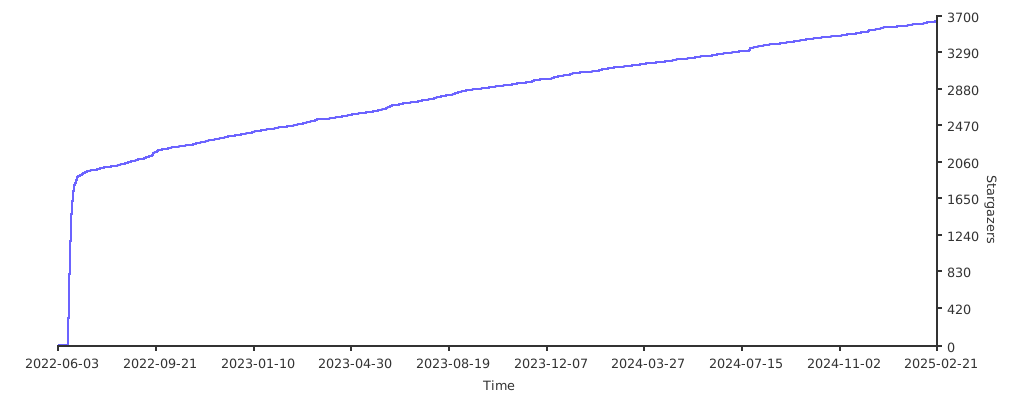
## Stargazers over time
|
|
|
|
[](https://starchart.cc/grafana/oncall)
|
|
|
|
## Further Reading
|
|
|
|
- _Automated migration from other on-call tools_ - [Migrator](https://github.com/grafana/oncall/tree/dev/tools/migrators)
|
|
- _Documentation_ - [Grafana OnCall](https://grafana.com/docs/oncall/latest/)
|
|
- _Overview Webinar_ - [YouTube](https://www.youtube.com/watch?v=7uSe1pulgs8)
|
|
- _How To Add Integration_ - [How to Add Integration](https://github.com/grafana/oncall/tree/dev/engine/config_integrations/README.md)
|
|
- _Blog Post_ - [Announcing Grafana OnCall, the easiest way to do on-call management](https://grafana.com/blog/2021/11/09/announcing-grafana-oncall/)
|
|
- _Presentation_ - [Deep dive into the Grafana, Prometheus, and Alertmanager stack for alerting and on-call management](https://grafana.com/go/observabilitycon/2021/alerting/?pg=blog)
|