 78d01df864
* Modify `docker-compose-developer` configuration files, and `Makefile`
to support running everything in containers for local development

- Make use of the COMPOSE_PROFILES env var that is supported by
docker-compose to allow swapping-out/turning off certain docker-compose
services.
- add makefile cleanup command. Will remove all docker resources related
to running the project locally
- The "restart grafana container" issue, where users would need
to restart their grafana container when setting up the project for the
first time, is now fixed (make command now runs yarn build:dev before docker-compose startup;
this ensures grafana-plugin/dist is available for grafana container before it starts up)
- The DEVELOPER.md has been updated as well to reflect these new changes. It
has been moved to ./dev/README.md (and references to the old file have
been updated).
- The redis image that is referenced in the docker-compose files
has been pinned to v7.0.5 (latest version as of this commit) to avoid
any surprises w/ future releases.
- remove root .dockerignore in favour of individual .dockerignore files
in ./engine and ./grafana-plugin
96 lines
4.2 KiB
Markdown
96 lines
4.2 KiB
Markdown
<img width="400px" src="docs/img/logo.png">
|
|
|
|
[](https://github.com/grafana/oncall/releases)
|
|
[](https://github.com/grafana/oncall/blob/dev/LICENSE)
|
|
[](https://hub.docker.com/r/grafana/oncall/tags)
|
|
[](https://slack.grafana.com/)
|
|
[](https://github.com/grafana/oncall/discussions)
|
|
[](https://drone.grafana.net/grafana/oncall)
|
|
|
|
Developer-friendly incident response with brilliant Slack integration.
|
|
|
|
<img width="60%" src="screenshot.png">
|
|
|
|
- Collect and analyze alerts from multiple monitoring systems
|
|
- On-call rotations based on schedules
|
|
- Automatic escalations
|
|
- Phone calls, SMS, Slack, Telegram notifications
|
|
|
|
## Getting Started
|
|
|
|
We prepared multiple environments:
|
|
|
|
- [production](https://grafana.com/docs/grafana-cloud/oncall/open-source/#production-environment)
|
|
- [developer](./dev/README.md)
|
|
- hobby (described in the following steps)
|
|
|
|
1. Download [`docker-compose.yml`](docker-compose.yml):
|
|
|
|
```bash
|
|
curl -fsSL https://raw.githubusercontent.com/grafana/oncall/dev/docker-compose.yml -o docker-compose.yml
|
|
```
|
|
|
|
2. Set variables:
|
|
|
|
```bash
|
|
echo "DOMAIN=http://localhost:8080
|
|
COMPOSE_PROFILES=with_grafana # Remove this line if you want to use existing grafana
|
|
SECRET_KEY=my_random_secret_must_be_more_than_32_characters_long" > .env
|
|
```
|
|
|
|
3. Launch services:
|
|
|
|
```bash
|
|
docker-compose up -d
|
|
```
|
|
|
|
4. Issue one-time invite token:
|
|
|
|
```bash
|
|
docker-compose run engine python manage.py issue_invite_for_the_frontend --override
|
|
```
|
|
|
|
**Note**: if you remove the plugin configuration and reconfigure it, you will need to generate a new one-time invite token for your new configuration.
|
|
|
|
5. Go to [OnCall Plugin Configuration](http://localhost:3000/plugins/grafana-oncall-app), using log in credentials as defined above: `admin`/`admin` (or find OnCall plugin in configuration->plugins) and connect OnCall _plugin_ with OnCall _backend_:
|
|
|
|
```
|
|
Invite token: ^^^ from the previous step.
|
|
OnCall backend URL: http://engine:8080
|
|
Grafana Url: http://grafana:3000
|
|
```
|
|
|
|
6. Enjoy! Check our [OSS docs](https://grafana.com/docs/grafana-cloud/oncall/open-source/) if you want to set up Slack, Telegram, Twilio or SMS/calls through Grafana Cloud.
|
|
|
|
## Update version
|
|
|
|
To update your Grafana OnCall hobby environment:
|
|
|
|
```shell
|
|
# Update Docker image
|
|
docker-compose pull engine
|
|
|
|
# Re-deploy
|
|
docker-compose up -d
|
|
```
|
|
|
|
After updating the engine, you'll also need to click the "Update" button on the [plugin version page](http://localhost:3000/plugins/grafana-oncall-app?page=version-history).
|
|
See [Grafana docs](https://grafana.com/docs/grafana/latest/administration/plugin-management/#update-a-plugin) for more info on updating Grafana plugins.
|
|
|
|
## Join community
|
|
|
|
<a href="https://github.com/grafana/oncall/discussions/categories/community-calls"><img width="200px" src="docs/img/community_call.png"></a>
|
|
<a href="https://github.com/grafana/oncall/discussions"><img width="200px" src="docs/img/GH_discussions.png"></a>
|
|
<a href="https://slack.grafana.com/"><img width="200px" src="docs/img/slack.png"></a>
|
|
|
|
## Stargazers over time
|
|
|
|
[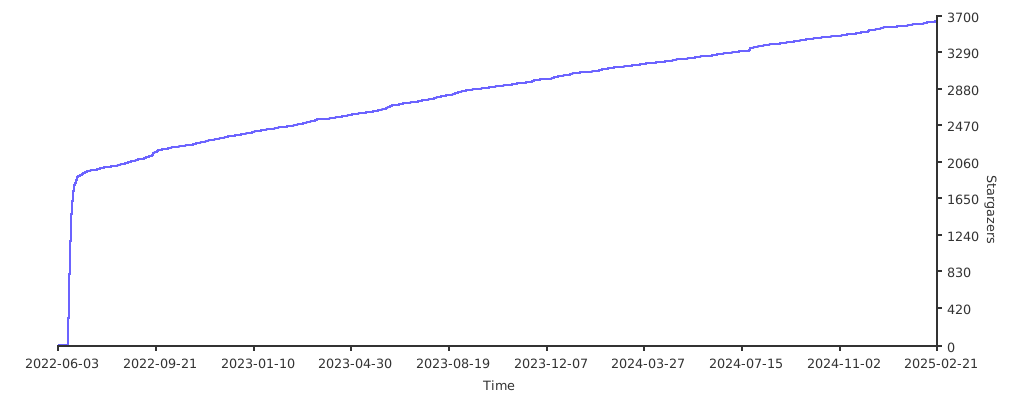](https://starchart.cc/grafana/oncall)
|
|
|
|
## Further Reading
|
|
|
|
- _Migration from the PagerDuty_ - [Migrator](https://github.com/grafana/oncall/tree/dev/tools/pagerduty-migrator)
|
|
- _Documentation_ - [Grafana OnCall](https://grafana.com/docs/grafana-cloud/oncall/)
|
|
- _How To Add Integration_ - [How to Add Integration](https://github.com/grafana/oncall/tree/dev/engine/config_integrations/README.md)
|
|
- _Blog Post_ - [Announcing Grafana OnCall, the easiest way to do on-call management](https://grafana.com/blog/2021/11/09/announcing-grafana-oncall/)
|
|
- _Presentation_ - [Deep dive into the Grafana, Prometheus, and Alertmanager stack for alerting and on-call management](https://grafana.com/go/observabilitycon/2021/alerting/?pg=blog)
|