 fa071bcd6e
# What this PR does Inspired by [this discussion](https://github.com/grafana/oncall/pull/5307#discussion_r1862449480). _tldr;_ ensures that if any of our tests try making an external network call, they will fail. Setup an example test: ```python def test_external_network_call(): import requests response = requests.get('https://www.example.com') assert response.status_code == 200 ``` and it worked (failed; [example CI test run](https://github.com/grafana/oncall/actions/runs/12106416991/job/33752144727?pr=5315#step:6:389)) as expected: ```bash __________________________ test_external_network_call __________________________ def test_external_network_call(): import requests > response = requests.get('https://www.example.com') requests = <module 'requests' from '/opt/hostedtoolcache/Python/3.12.3/x64/lib/python3.12/site-packages/requests/__init__.py'> apps/test_joey.py:4: _ _ _ _ _ _ _ _ _ _ _ _ _ _ _ _ _ _ _ _ _ _ _ _ _ _ _ _ _ _ _ _ _ _ _ _ _ _ _ _ /opt/hostedtoolcache/Python/3.12.3/x64/lib/python3.12/site-packages/requests/api.py:73: in get return request("get", url, params=params, **kwargs) kwargs = {} params = None url = 'https://www.example.com' /opt/hostedtoolcache/Python/3.12.3/x64/lib/python3.12/site-packages/requests/api.py:59: in request return session.request(method=method, url=url, **kwargs) kwargs = {'params': None} method = 'get' session = <requests.sessions.Session object at 0x7f10ebaada90> url = 'https://www.example.com' /opt/hostedtoolcache/Python/3.12.3/x64/lib/python3.12/site-packages/requests/sessions.py:589: in request resp = self.send(prep, **send_kwargs) allow_redirects = True auth = None cert = None cookies = None data = None files = None headers = None hooks = None json = None method = 'get' params = None prep = <PreparedRequest [GET]> proxies = {} req = <Request [GET]> self = <requests.sessions.Session object at 0x7f10ebaada90> send_kwargs = {'allow_redirects': True, 'cert': None, 'proxies': OrderedDict(), 'stream': False, ...} settings = {'cert': None, 'proxies': OrderedDict(), 'stream': False, 'verify': True} stream = None timeout = None url = 'https://www.example.com' verify = None /opt/hostedtoolcache/Python/3.12.3/x64/lib/python3.12/site-packages/requests/sessions.py:703: in send r = adapter.send(request, **kwargs) adapter = <requests.adapters.HTTPAdapter object at 0x7f10ebaada30> allow_redirects = True hooks = {'response': []} kwargs = {'cert': None, 'proxies': OrderedDict(), 'stream': False, 'timeout': None, ...} request = <PreparedRequest [GET]> self = <requests.sessions.Session object at 0x7f10ebaada90> start = 1733064371.649901 stream = False /opt/hostedtoolcache/Python/3.12.3/x64/lib/python3.12/site-packages/requests/adapters.py:667: in send resp = conn.urlopen( cert = None chunked = False conn = <urllib3.connectionpool.HTTPSConnectionPool object at 0x7f10ebaadd30> proxies = OrderedDict() request = <PreparedRequest [GET]> self = <requests.adapters.HTTPAdapter object at 0x7f10ebaada30> stream = False timeout = Timeout(connect=None, read=None, total=None) url = '/' verify = True /opt/hostedtoolcache/Python/3.12.3/x64/lib/python3.12/site-packages/urllib3/connectionpool.py:715: in urlopen httplib_response = self._make_request( assert_same_host = False body = None body_pos = None chunked = False clean_exit = False conn = None destination_scheme = None err = None headers = {'User-Agent': 'python-requests/2.32.3', 'Accept-Encoding': 'gzip, deflate', 'Accept': '*/*', 'Connection': 'keep-alive'} http_tunnel_required = False is_new_proxy_conn = False method = 'GET' parsed_url = Url(scheme=None, auth=None, host=None, port=None, path='/', query=None, fragment=None) pool_timeout = None redirect = False release_conn = False release_this_conn = True response_kw = {'decode_content': False, 'preload_content': False} retries = Retry(total=0, connect=None, read=False, redirect=None, status=None) self = <urllib3.connectionpool.HTTPSConnectionPool object at 0x7f10ebaadd30> timeout = Timeout(connect=None, read=None, total=None) timeout_obj = Timeout(connect=None, read=None, total=None) url = '/' /opt/hostedtoolcache/Python/3.12.3/x64/lib/python3.12/site-packages/urllib3/connectionpool.py:404: in _make_request self._validate_conn(conn) chunked = False conn = <urllib3.connection.HTTPSConnection object at 0x7f10ebaadd60> httplib_request_kw = {'body': None, 'headers': {'User-Agent': 'python-requests/2.32.3', 'Accept-Encoding': 'gzip, deflate', 'Accept': '*/*', 'Connection': 'keep-alive'}} method = 'GET' self = <urllib3.connectionpool.HTTPSConnectionPool object at 0x7f10ebaadd30> timeout = Timeout(connect=None, read=None, total=None) timeout_obj = Timeout(connect=None, read=None, total=None) url = '/' /opt/hostedtoolcache/Python/3.12.3/x64/lib/python3.12/site-packages/urllib3/connectionpool.py:1060: in _validate_conn conn.connect() __class__ = <class 'urllib3.connectionpool.HTTPSConnectionPool'> conn = <urllib3.connection.HTTPSConnection object at 0x7f10ebaadd60> self = <urllib3.connectionpool.HTTPSConnectionPool object at 0x7f10ebaadd30> /opt/hostedtoolcache/Python/3.12.3/x64/lib/python3.12/site-packages/urllib3/connection.py:363: in connect self.sock = conn = self._new_conn() self = <urllib3.connection.HTTPSConnection object at 0x7f10ebaadd60> /opt/hostedtoolcache/Python/3.12.3/x64/lib/python3.12/site-packages/urllib3/connection.py:174: in _new_conn conn = connection.create_connection( extra_kw = {'socket_options': [(6, 1, 1)]} self = <urllib3.connection.HTTPSConnection object at 0x7f10ebaadd60> /opt/hostedtoolcache/Python/3.12.3/x64/lib/python3.12/site-packages/urllib3/util/connection.py:85: in create_connection sock.connect(sa) address = ('www.example.com', 443) af = <AddressFamily.AF_INET: 2> canonname = '' err = None family = <AddressFamily.AF_UNSPEC: 0> host = 'www.example.com' port = 443 proto = 6 res = (<AddressFamily.AF_INET: 2>, <SocketKind.SOCK_STREAM: 1>, 6, '', ('93.184.215.14', 443)) sa = ('93.184.215.14', 443) sock = <socket.socket fd=12, family=2, type=1, proto=6, laddr=('0.0.0.0', 0)> socket_options = [(6, 1, 1)] socktype = <SocketKind.SOCK_STREAM: 1> source_address = None timeout = None _ _ _ _ _ _ _ _ _ _ _ _ _ _ _ _ _ _ _ _ _ _ _ _ _ _ _ _ _ _ _ _ _ _ _ _ _ _ _ _ inst = <socket.socket fd=12, family=2, type=1, proto=6, laddr=('0.0.0.0', 0)> args = (('93.184.215.14', 443),), host = '93.184.215.14' def guarded_connect(inst, *args): host = host_from_connect_args(args) if host in allowed_ip_hosts_and_hostnames or ( _is_unix_socket(inst.family) and allow_unix_socket ): return _true_connect(inst, *args) > raise SocketConnectBlockedError(allowed_list, host) E pytest_socket.SocketConnectBlockedError: A test tried to use socket.socket.connect() with host "93.184.215.14" (allowed: "calendar.google.com (142.251.167.100,142.251.167.101,142.251.167.102,142.251.167.113,142.251.167.138,142.251.167.139,2607:f8b0:4004:c09::65,2607:f8b0:4004:c09::66,2607:f8b0:4004:c09::71,2607:f8b0:4004:c09::8b),localhost (127.0.0.1,::1),oncall-dev-mariadb ()"). allow_unix_socket = False allowed_ip_hosts_and_hostnames = {'127.0.0.1', '142.251.167.100', '142.251.167.101', '142.251.167.102', '142.251.167.113', '142.251.167.138', ...} allowed_list = ['calendar.google.com (142.251.167.100,142.251.167.101,142.251.167.102,142.251.167.113,142.251.167.138,142.251.167.139...8b0:4004:c09::66,2607:f8b0:4004:c09::71,2607:f8b0:4004:c09::8b)', 'localhost (127.0.0.1,::1)', 'oncall-dev-mariadb ()'] args = (('93.184.215.14', 443),) host = '93.184.215.14' inst = <socket.socket fd=12, family=2, type=1, proto=6, laddr=('0.0.0.0', 0)> /opt/hostedtoolcache/Python/3.12.3/x64/lib/python3.12/site-packages/pytest_socket.py:252: SocketConnectBlockedError ``` ## Checklist - [x] Unit, integration, and e2e (if applicable) tests updated - [x] Documentation added (or `pr:no public docs` PR label added if not required) - [x] Added the relevant release notes label (see labels prefixed w/ `release:`). These labels dictate how your PR will show up in the autogenerated release notes. |
||
|---|---|---|
| .github | ||
| .tilt | ||
| dev | ||
| docs | ||
| engine | ||
| grafana-plugin | ||
| helm | ||
| terraform | ||
| tools | ||
| .dockerignore | ||
| .gitattributes | ||
| .gitignore | ||
| .markdownlint.json | ||
| .markdownlintignore | ||
| .nvmrc | ||
| .pre-commit-config.yaml | ||
| .prettierignore | ||
| .prettierrc.js | ||
| .yamllint.yml | ||
| CHANGELOG.md | ||
| docker-compose-developer.yml | ||
| docker-compose-mysql-rabbitmq.yml | ||
| docker-compose.yml | ||
| LICENSE | ||
| Makefile | ||
| README.md | ||
| Tiltfile | ||
Grafana OnCall






Developer-friendly incident response with brilliant Slack integration.
 |

- Collect and analyze alerts from multiple monitoring systems
- On-call rotations based on schedules
- Automatic escalations
- Phone calls, SMS, Slack, Telegram notifications
Getting Started
Important
These instructions are for using Grafana 11 or newer. You must enable the feature toggle for
externalServiceAccounts. This is already done for the docker files and helm charts. If you are running Grafana separately see the Grafana documentation on how to enable this.
We prepared multiple environments:
- production
- developer
- hobby (described in the following steps)
-
Download
docker-compose.yml:curl -fsSL https://raw.githubusercontent.com/grafana/oncall/dev/docker-compose.yml -o docker-compose.yml -
Set variables:
echo "DOMAIN=http://localhost:8080 # Remove 'with_grafana' below if you want to use existing grafana # Add 'with_prometheus' below to optionally enable a local prometheus for oncall metrics # e.g. COMPOSE_PROFILES=with_grafana,with_prometheus COMPOSE_PROFILES=with_grafana # to setup an auth token for prometheus exporter metrics: # PROMETHEUS_EXPORTER_SECRET=my_random_prometheus_secret # also, make sure to enable the /metrics endpoint: # FEATURE_PROMETHEUS_EXPORTER_ENABLED=True SECRET_KEY=my_random_secret_must_be_more_than_32_characters_long" > .env -
(Optional) If you want to enable/setup the prometheus metrics exporter (besides the changes above), create a
prometheus.ymlfile (replacingmy_random_prometheus_secretaccordingly), next to yourdocker-compose.yml:echo "global: scrape_interval: 15s evaluation_interval: 15s scrape_configs: - job_name: prometheus metrics_path: /metrics/ authorization: credentials: my_random_prometheus_secret static_configs: - targets: [\"host.docker.internal:8080\"]" > prometheus.ymlNOTE: you will need to setup a Prometheus datasource using
http://prometheus:9090as the URL in the Grafana UI. -
Launch services:
docker-compose pull && docker-compose up -d -
Provision the plugin (If you run Grafana outside the included docker files install the plugin before these steps):
If you are using the included docker compose file use
admin/admincredentials andlocalhost:3000to perform this task. If you have configured Grafana differently adjust your credentials and hostnames accordingly.# Note: onCallApiUrl 'engine' and grafanaUrl 'grafana' use the name from the docker compose file. If you are # running your grafana or oncall engine instance with another hostname adjust accordingly. curl -X POST 'http://admin:admin@localhost:3000/api/plugins/grafana-oncall-app/settings' -H "Content-Type: application/json" -d '{"enabled":true, "jsonData":{"stackId":5, "orgId":100, "onCallApiUrl":"http://engine:8080", "grafanaUrl":"http://grafana:3000"}}' curl -X POST 'http://admin:admin@localhost:3000/api/plugins/grafana-oncall-app/resources/plugin/install' -
Start using OnCall, log in to Grafana with credentials as defined above:
admin/admin -
Enjoy! Check our OSS docs if you want to set up Slack, Telegram, Twilio or SMS/calls through Grafana Cloud.
Troubleshooting
Here are some API calls that can be made to help if you are having difficulty connecting Grafana and OnCall. (Modify parameters to match your credentials and environment)
# Use this to get more information about the connection between Grafana and OnCall
curl -X GET 'http://admin:admin@localhost:3000/api/plugins/grafana-oncall-app/resources/plugin/status'
# If you added a user or changed permissions and don't see it show up in OnCall you can manually trigger sync.
# Note: This is called automatically when the app is loaded (page load/refresh) but there is a 5 min timeout so
# that it does not generate unnecessary activity.
curl -X POST 'http://admin:admin@localhost:3000/api/plugins/grafana-oncall-app/resources/plugin/sync'
Update version
To update your Grafana OnCall hobby environment:
# Update Docker image
docker-compose pull engine

# Re-deploy
docker-compose up -d
After updating the engine, you'll also need to click the "Update" button on the plugin version page. See Grafana docs for more info on updating Grafana plugins.
Join community


Have a question, comment or feedback? Don't be afraid to open an issue!
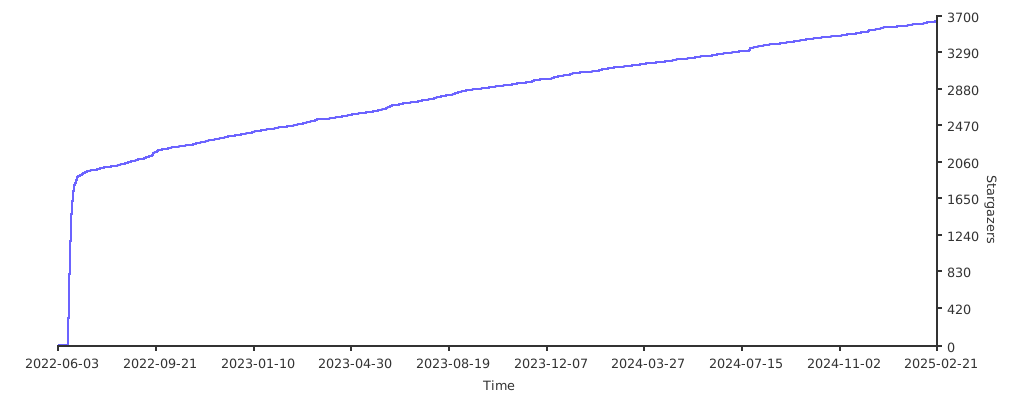
Stargazers over time
Further Reading
- Automated migration from other on-call tools - Migrator
- Documentation - Grafana OnCall
- Overview Webinar - YouTube
- How To Add Integration - How to Add Integration
- Blog Post - Announcing Grafana OnCall, the easiest way to do on-call management
- Presentation - Deep dive into the Grafana, Prometheus, and Alertmanager stack for alerting and on-call management