Grafana OnCall engine fork — self-hosted on-call scheduler and alert router
 f299fb9814
## Which issue(s) this PR fixes - Wrong field name in validation (Verbal name is required, but should be Name is required) - For messenger templates we need to keep \n in the beginning of the result -Save and Open in slack button should not close drawer - If user edit templates, button Cancel should return to templates drawer - Cheatsheet should have a scroll, not main drawer - narrow screen issues in cheatsheet - How integration works should have the dynamic integration name (first red mark). Alerting Contact point and notification policy should be mentioned only for Grafana Alerting https://files.slack.com/files-pri/T02S4RCS0-F0592BHP42G/screenshot_2023-05-23_at_11.45.29_am.png - Cheatsheet title doesn't match to template - Image is not rendered in Result of Edit Template https://files.slack.com/files-tmb/T02S4RCS0-F058TEPD214-27c1136ad2/screenshot_2023-05-23_at_1.02.47_pm_720.png - Add description to the Result of conditional template: if True Selected alert will resolve alert group else Selected alert will not resolve alert group. And change the icon from Warning to X - Opening cheatsheet resets the non-saved template](https://github.com/grafana/oncall-private/issues/1824#issuecomment-1560348999) |
||
|---|---|---|
| .github | ||
| dev | ||
| docs | ||
| engine | ||
| examples/terraform | ||
| grafana-plugin | ||
| helm | ||
| tools | ||
| .drone.yml | ||
| .gitignore | ||
| .markdownlint.json | ||
| .markdownlintignore | ||
| .pre-commit-config.yaml | ||
| CHANGELOG.md | ||
| CODE_OF_CONDUCT.md | ||
| docker-compose-developer.yml | ||
| docker-compose-mysql-rabbitmq.yml | ||
| docker-compose.yml | ||
| GOVERNANCE.md | ||
| LICENSE | ||
| LICENSING.md | ||
| MAINTAINERS.md | ||
| Makefile | ||
| README.md | ||
| screenshot.png | ||
| screenshot_mobile.png | ||
Grafana OnCall







Developer-friendly incident response with brilliant Slack integration.
 |


- Collect and analyze alerts from multiple monitoring systems
- On-call rotations based on schedules
- Automatic escalations
- Phone calls, SMS, Slack, Telegram notifications
Getting Started
We prepared multiple environments:
- production
- developer
- hobby (described in the following steps)
-
Download
docker-compose.yml:curl -fsSL https://raw.githubusercontent.com/grafana/oncall/dev/docker-compose.yml -o docker-compose.yml -
Set variables:
echo "DOMAIN=http://localhost:8080 COMPOSE_PROFILES=with_grafana # Remove this line if you want to use existing grafana SECRET_KEY=my_random_secret_must_be_more_than_32_characters_long" > .env -
Launch services:
docker-compose pull && docker-compose up -d -
Go to OnCall Plugin Configuration, using log in credentials as defined above:
admin/admin(or find OnCall plugin in configuration->plugins) and connect OnCall plugin with OnCall backend:OnCall backend URL: http://engine:8080 -
Enjoy! Check our OSS docs if you want to set up Slack, Telegram, Twilio or SMS/calls through Grafana Cloud.
Update version
To update your Grafana OnCall hobby environment:
# Update Docker image
docker-compose pull engine

# Re-deploy
docker-compose up -d
After updating the engine, you'll also need to click the "Update" button on the plugin version page. See Grafana docs for more info on updating Grafana plugins.
Join community


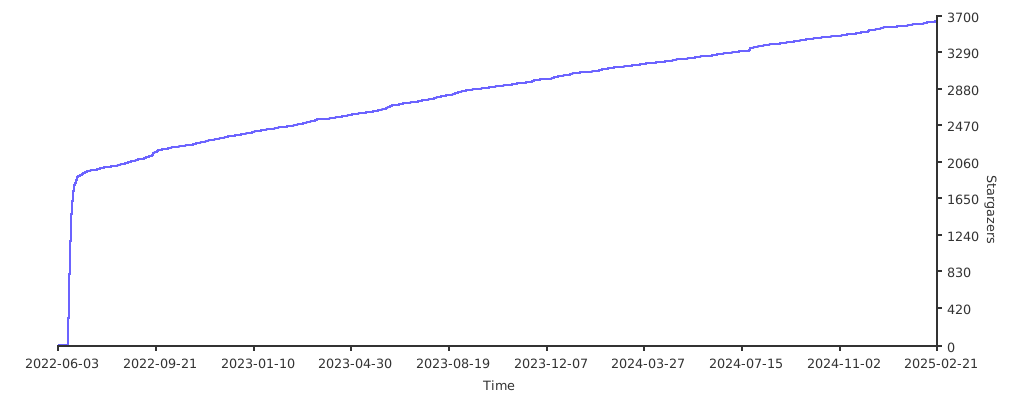
Stargazers over time
Further Reading
- Migration from PagerDuty - Migrator
- Documentation - Grafana OnCall
- Overview Webinar - YouTube
- How To Add Integration - How to Add Integration
- Blog Post - Announcing Grafana OnCall, the easiest way to do on-call management
- Presentation - Deep dive into the Grafana, Prometheus, and Alertmanager stack for alerting and on-call management