Grafana OnCall engine fork — self-hosted on-call scheduler and alert router
 ed5b5e153d
# What this PR does
Adds mobile app settings support to OnCall backend.

- Adds a new Django model `MobileAppUserSettings` to store push
notification settings
- Adds a new endpoint `/mobile_app/v1/user_settings` to fetch/update
settings from the mobile app

Some additional info on implementation: at first I wanted to extend the
messaging backend system to allow storing / retrieving per-user data and
implement mobile app settings based on those changes. After some thought
I decided not to extend the messaging backend system and have this as
functionality specific to the `mobile_app` Django app. Currently the
messaging backend system is used by the backend and plugin UI, but
mobile app settings are specific only to the mobile app and not
configurable in the plugin UI.

**tldr: wanted to extend messaging backend system, but decided not to do
that**

# Usage

## Get settings via API

`GET /mobile_app/v1/user_settings`
Example response:

```json
{
  "default_notification_sound_name": "default_sound",  # sound name without file extension
  "default_notification_volume_type": "constant",
  "default_notification_volume": 0.8,
  "default_notification_volume_override": false,
  "important_notification_sound_name": "default_sound_important",  # sound name without file extension
  "important_notification_volume_type": "constant",
  "important_notification_volume": 0.8,
  "important_notification_override_dnd": true
}
```

## Update settings via API
`PUT /mobile_app/v1/user_settings` - see example response above for
payload shape.

Note that sound names must be passed without file extension. When
sending push notifications, the backend will add `.mp3` to sound names
and pass it to push notification data for Android. For iOS, sound names
will be suffixed with `.aiff` to be used by APNS.


## Get settings from notification data for Android
All the settings from example response will be available in push
notification data (along with `orgId`, `alertGroupId`, `title`, etc.).
Fields `default_notification_volume`,
`default_notification_volume_override` and
`important_notification_volume` , `important_notification_override_dnd`
will be converted to strings due to FCM limitations.
Fields `default_notification_sound_name` and
`important_notification_sound_name` will be suffixed with `.mp3` in push
notification data.

## iOS limitations
While Android push notifications are handled purely on the mobile app
side, iOS notifications are sent via APNS which imposes some
limitations.
- Notification volume cannot be overridden for non-critical
notifications (so fields `default_notification_volume_override` and
`default_notification_volume` will be disregarded for iOS notifications)
- It's not possible to control volume type (i.e. "constant" vs
"intensifying") via APNS. A possible workaround is to have different
sound files for "constant" and "intensifying" and pass that as
`default_notification_sound_name` / `important_notification_sound_name`.

# Which issue(s) this PR fixes
Related to https://github.com/grafana/oncall-private/issues/1602

# Checklist

- [x] Tests updated
- [x] No changelog updates since the changes are not user-facing
|
||
|---|---|---|
| .github | ||
| dev | ||
| docs | ||
| engine | ||
| examples/terraform | ||
| grafana-plugin | ||
| helm | ||
| tools | ||
| .drone.yml | ||
| .gitignore | ||
| .markdownlint.json | ||
| .markdownlintignore | ||
| .nvmrc | ||
| .pre-commit-config.yaml | ||
| CHANGELOG.md | ||
| CODE_OF_CONDUCT.md | ||
| docker-compose-developer.yml | ||
| docker-compose-mysql-rabbitmq.yml | ||
| docker-compose.yml | ||
| GOVERNANCE.md | ||
| LICENSE | ||
| LICENSING.md | ||
| MAINTAINERS.md | ||
| Makefile | ||
| README.md | ||
| screenshot.png | ||
| SECURITY.md | ||

Grafana OnCall







Developer-friendly incident response with brilliant Slack integration.

- Collect and analyze alerts from multiple monitoring systems
- On-call rotations based on schedules
- Automatic escalations
- Phone calls, SMS, Slack, Telegram notifications
Getting Started
We prepared multiple environments:
- production
- developer
- hobby (described in the following steps)
-
Download
docker-compose.yml:curl -fsSL https://raw.githubusercontent.com/grafana/oncall/dev/docker-compose.yml -o docker-compose.yml -
Set variables:
echo "DOMAIN=http://localhost:8080 COMPOSE_PROFILES=with_grafana # Remove this line if you want to use existing grafana SECRET_KEY=my_random_secret_must_be_more_than_32_characters_long" > .env -
Launch services:
docker-compose pull && docker-compose up -d -
Go to OnCall Plugin Configuration, using log in credentials as defined above:
admin/admin(or find OnCall plugin in configuration->plugins) and connect OnCall plugin with OnCall backend:OnCall backend URL: http://engine:8080 -
Enjoy! Check our OSS docs if you want to set up Slack, Telegram, Twilio or SMS/calls through Grafana Cloud.
Update version
To update your Grafana OnCall hobby environment:
# Update Docker image
docker-compose pull engine

# Re-deploy
docker-compose up -d
After updating the engine, you'll also need to click the "Update" button on the plugin version page. See Grafana docs for more info on updating Grafana plugins.
Join community


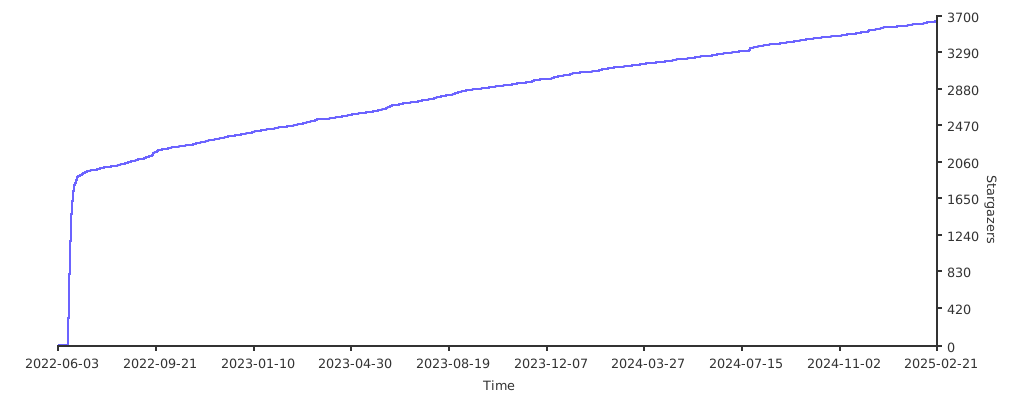
Stargazers over time
Further Reading
- Migration from PagerDuty - Migrator
- Documentation - Grafana OnCall
- Overview Webinar - YouTube
- How To Add Integration - How to Add Integration
- Blog Post - Announcing Grafana OnCall, the easiest way to do on-call management
- Presentation - Deep dive into the Grafana, Prometheus, and Alertmanager stack for alerting and on-call management