Grafana OnCall engine fork — self-hosted on-call scheduler and alert router
 e67d3519fe
* remove email verification related code * remove email verification related code * remove sendgrid callback * remove sendgrid related code * remove sendgrid related code * rename sendgrid app to email * remove email from built-in channels * remove email from built-in channels * remove email from built-in channels * add email backend: https://github.com/grafana/oncall/pull/50 * add email templater * add email templater * convert md to html * add email settings to live settings * use task to send email, handle some exceptions to create logs * remove ERROR_NOTIFICATION_MAIL_DELIVERY_FAILED usage * add email limit logic * fix tests * add docs * remove old email templates * remove old email templates * add template_fields to messaging backend * add messaging backends templates to public api * add comment for deprecated fields * fix test * fix tests * disable email by default * don't retry on SMTPException and TimeoutError * add tests * bring email back to public api docs * return ERROR_NOTIFICATION_MAIL_LIMIT_EXCEEDED * make template_fields tuple * build_subject_and_title -> build_subject_and_message * add one more comment about template deprecation * use 8 as backend id * add comment about gaierror and BadHeaderError * add comment on importing in notify_user_async * edit oss docs |
||
|---|---|---|
| .github | ||
| docs | ||
| engine | ||
| examples/terraform | ||
| grafana-plugin | ||
| helm | ||
| tools | ||
| .dockerignore | ||
| .drone.yml | ||
| .env.dev.example | ||
| .gitignore | ||
| .pre-commit-config.yaml | ||
| CHANGELOG.md | ||
| CODE_OF_CONDUCT.md | ||
| DEVELOPER.md | ||
| docker-compose-developer-pg.yml | ||
| docker-compose-developer.yml | ||
| docker-compose.yml | ||
| GOVERNANCE.md | ||
| LICENSE | ||
| LICENSING.md | ||
| MAINTAINERS.md | ||
| Makefile | ||
| README.md | ||
| screenshot.png | ||
| SECURITY.md | ||








Developer-friendly incident response with brilliant Slack integration.

- Collect and analyze alerts from multiple monitoring systems
- On-call rotations based on schedules
- Automatic escalations
- Phone calls, SMS, Slack, Telegram notifications
Getting Started
We prepared multiple environments: production, developer and hobby:
- Download docker-compose.yaml:
curl -fsSL https://raw.githubusercontent.com/grafana/oncall/dev/docker-compose.yml -o docker-compose.yml
- Set variables:
echo "DOMAIN=http://localhost:8080
COMPOSE_PROFILES=with_grafana  # Remove this line if you want to use existing grafana
SECRET_KEY=my_random_secret_must_be_more_than_32_characters_long
RABBITMQ_PASSWORD=rabbitmq_secret_pw
MYSQL_PASSWORD=mysql_secret_pw" > .env
- Launch services:
docker-compose up -d
- Issue one-time invite token:
docker-compose run engine python manage.py issue_invite_for_the_frontend --override
Note: if you remove the plugin configuration and reconfigure it, you will need to generate a new one-time invite token for your new configuration.
- Go to OnCall Plugin Configuration, using log in credentials as defined above:
admin/admin(or find OnCall plugin in configuration->plugins) and connect OnCall plugin with OnCall backend:
Invite token: ^^^ from the previous step.
OnCall backend URL: http://engine:8080
Grafana Url: http://grafana:3000
- Enjoy! Check our OSS docs if you want to set up Slack, Telegram, Twilio or SMS/calls through Grafana Cloud.
Update version
To update your Grafana OnCall hobby environment:
# Update Docker image
docker-compose pull engine

# Re-deploy
docker-compose up -d
After updating the engine, you'll also need to click the "Update" button on the plugin version page. See Grafana docs for more info on updating Grafana plugins.
Join community


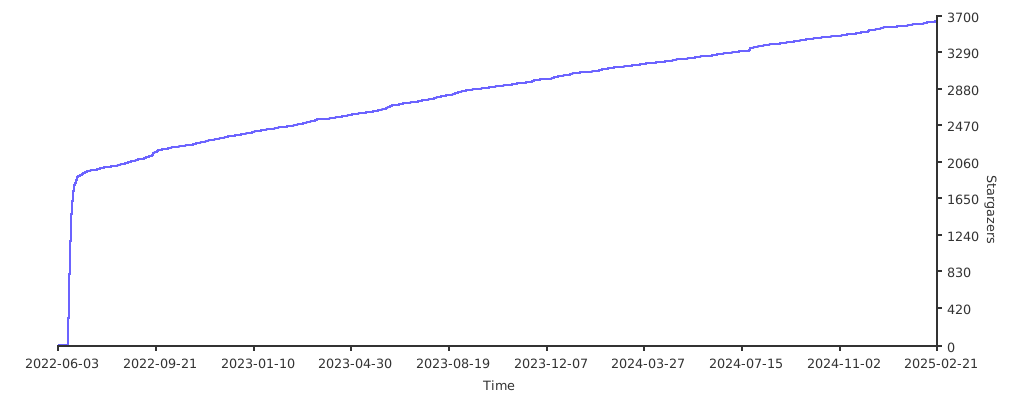
Stargazers over time
Further Reading
- Migration from the PagerDuty - Migrator
- Documentation - Grafana OnCall
- Blog Post - Announcing Grafana OnCall, the easiest way to do on-call management
- Presentation - Deep dive into the Grafana, Prometheus, and Alertmanager stack for alerting and on-call management