Grafana OnCall engine fork — self-hosted on-call scheduler and alert router
 d1373b58d2
# What this PR does Reworks Slack handlers for buttons and select menus for AG Slack messages. <img width="602" alt="Screenshot 2023-05-31 at 19 34 05" src="https://github.com/grafana/oncall/assets/20116910/857bf096-7bdd-427b-94b6-15aad873a8ac"> ## Current implementation - It's possible to end up with orphaned Slack messages that are posted to Slack but have no `SlackMessage` instance in the DB. For such messages, clicking buttons will result in an exception and HTTP 500. See private repo [issue](https://github.com/grafana/oncall-private/issues/1841) for more info. - Bug in authorization system, which effectively bypasses any permission checks. For example, it's possible to resolve an alert group while being a Viewer. - No tests covering most buttons. ## Changes in this PR - Make the system more robust, don't use `SlackMessage` model to figure out the alert group being interacted on, instead embed `alert_group_pk` to every button and use it when receiving interaction requests from Slack. - Existing orphaned Slack messages will be repaired. Clicking buttons under orphaned messages will work (and missing `SlackMessage` instance will be created on interaction). This is possible because some buttons already have `alert_group_pk` embedded, and it's possible to get this data on button clicks (even if the clicked button itself doesn't have `alert_group_pk` embedded). - Fix authorization. Show warning window when unauthorized: <img width="511" alt="Screenshot 2023-05-31 at 19 40 02" src="https://github.com/grafana/oncall/assets/20116910/5abeeaa7-1b61-4a47-b3af-0e21d5cd1907"> - Added tests for all the buttons under AG message. Add tests checking authorization, actual execution of scenario steps, orphan message repairing, backward compatibility, etc. Also add tests on `AlertGroupSlackRenderer` checking that correct data is embedded into buttons. - Cosmetic changes such as renaming `incident` to `Alert Group`. ## Which issue(s) this PR fixes Related to https://github.com/grafana/oncall-private/issues/1841 ## Checklist - [x] Unit, integration, and e2e (if applicable) tests updated - [x] Documentation added (or `pr:no public docs` PR label added if not required) - [x] `CHANGELOG.md` updated (or `pr:no changelog` PR label added if not required) |
||
|---|---|---|
| .github | ||
| dev | ||
| docs | ||
| engine | ||
| examples/terraform | ||
| grafana-plugin | ||
| helm | ||
| tools | ||
| .drone.yml | ||
| .gitignore | ||
| .markdownlint.json | ||
| .markdownlintignore | ||
| .pre-commit-config.yaml | ||
| CHANGELOG.md | ||
| CODE_OF_CONDUCT.md | ||
| docker-compose-developer.yml | ||
| docker-compose-mysql-rabbitmq.yml | ||
| docker-compose.yml | ||
| GOVERNANCE.md | ||
| LICENSE | ||
| LICENSING.md | ||
| MAINTAINERS.md | ||
| Makefile | ||
| README.md | ||
| screenshot.png | ||
| screenshot_mobile.png | ||
Grafana OnCall







Developer-friendly incident response with brilliant Slack integration.
 |


- Collect and analyze alerts from multiple monitoring systems
- On-call rotations based on schedules
- Automatic escalations
- Phone calls, SMS, Slack, Telegram notifications
Getting Started
We prepared multiple environments:
- production
- developer
- hobby (described in the following steps)
-
Download
docker-compose.yml:curl -fsSL https://raw.githubusercontent.com/grafana/oncall/dev/docker-compose.yml -o docker-compose.yml -
Set variables:
echo "DOMAIN=http://localhost:8080 COMPOSE_PROFILES=with_grafana # Remove this line if you want to use existing grafana SECRET_KEY=my_random_secret_must_be_more_than_32_characters_long" > .env -
Launch services:
docker-compose pull && docker-compose up -d -
Go to OnCall Plugin Configuration, using log in credentials as defined above:
admin/admin(or find OnCall plugin in configuration->plugins) and connect OnCall plugin with OnCall backend:OnCall backend URL: http://engine:8080 -
Enjoy! Check our OSS docs if you want to set up Slack, Telegram, Twilio or SMS/calls through Grafana Cloud.
Update version
To update your Grafana OnCall hobby environment:
# Update Docker image
docker-compose pull engine

# Re-deploy
docker-compose up -d
After updating the engine, you'll also need to click the "Update" button on the plugin version page. See Grafana docs for more info on updating Grafana plugins.
Join community


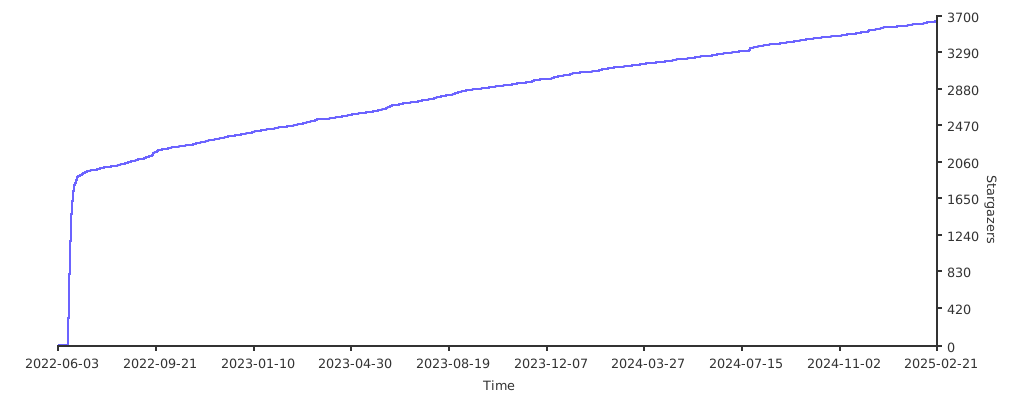
Stargazers over time
Further Reading
- Migration from PagerDuty - Migrator
- Documentation - Grafana OnCall
- Overview Webinar - YouTube
- How To Add Integration - How to Add Integration
- Blog Post - Announcing Grafana OnCall, the easiest way to do on-call management
- Presentation - Deep dive into the Grafana, Prometheus, and Alertmanager stack for alerting and on-call management