 aaae31a232
This PR adds filtering capabilities to the PagerDuty migrator tool and fixes user notification rule preservation behavior. Closes https://github.com/grafana/irm/issues/612 ## Changes ### 1. Added Resource Filtering Added the ability to filter PagerDuty resources during migration based on: - Team membership - User association - Name patterns (using regex) New environment variables for filtering: ``` PAGERDUTY_FILTER_TEAM PAGERDUTY_FILTER_USERS PAGERDUTY_FILTER_SCHEDULE_REGEX PAGERDUTY_FILTER_ESCALATION_POLICY_REGEX PAGERDUTY_FILTER_INTEGRATION_REGEX ``` #### Example Usage Filter by team: ```bash docker run --rm \ -e MIGRATING_FROM="pagerduty" \ -e MODE="plan" \ -e ONCALL_API_URL="<your-oncall-api-url>" \ -e ONCALL_API_TOKEN="<your-oncall-api-token>" \ -e PAGERDUTY_API_TOKEN="<your-pd-api-token>" \ -e PAGERDUTY_FILTER_TEAM="SRE Team" \ oncall-migrator ``` Filter by specific users: ```bash docker run --rm \ -e MIGRATING_FROM="pagerduty" \ -e MODE="plan" \ -e ONCALL_API_URL="<your-oncall-api-url>" \ -e ONCALL_API_TOKEN="<your-oncall-api-token>" \ -e PAGERDUTY_API_TOKEN="<your-pd-api-token>" \ -e PAGERDUTY_FILTER_USERS="P123ABC,P456DEF" \ oncall-migrator ``` Filter schedules by name pattern: ```bash docker run --rm \ -e MIGRATING_FROM="pagerduty" \ -e MODE="plan" \ -e ONCALL_API_URL="<your-oncall-api-url>" \ -e ONCALL_API_TOKEN="<your-oncall-api-token>" \ -e PAGERDUTY_API_TOKEN="<your-pd-api-token>" \ -e PAGERDUTY_FILTER_SCHEDULE_REGEX="^(Primary|Secondary)" \ oncall-migrator ``` Filter escalation policies by name pattern: ```bash docker run --rm \ -e MIGRATING_FROM="pagerduty" \ -e MODE="plan" \ -e ONCALL_API_URL="<your-oncall-api-url>" \ -e ONCALL_API_TOKEN="<your-oncall-api-token>" \ -e PAGERDUTY_API_TOKEN="<your-pd-api-token>" \ -e PAGERDUTY_FILTER_ESCALATION_POLICY_REGEX="^Prod" \ oncall-migrator ``` Filter integrations by name pattern: ```bash docker run --rm \ -e MIGRATING_FROM="pagerduty" \ -e MODE="plan" \ -e ONCALL_API_URL="<your-oncall-api-url>" \ -e ONCALL_API_TOKEN="<your-oncall-api-token>" \ -e PAGERDUTY_API_TOKEN="<your-pd-api-token>" \ -e PAGERDUTY_FILTER_INTEGRATION_REGEX="Prometheus$" \ oncall-migrator ``` ### 2. Fixed User Notification Rule Preservation Introduces a `PRESERVE_EXISTING_USER_NOTIFICATION_RULES` config (default of `true`). The migrator now: - does not delete user notification rules in Grafana OnCall, if the Grafana user already has some defined, AND `PRESERVE_EXISTING_USER_NOTIFICATION_RULES` is True - if the Grafana user has no personal notification rules defined in OnCall, we will create them - deletes existing user notification rules, and creates new ones, in Grafana OnCall, if `PRESERVE_EXISTING_USER_NOTIFICATION_RULES` is False - basically make sure that the state in Grafana OnCall matches the _latest_ state in PagerDuty - Improves logging to clearly indicate when rules are being preserved #### Example Usage Preserve existing notification policies (default): ```bash docker run --rm \ -e MIGRATING_FROM="pagerduty" \ -e MODE="migrate" \ -e ONCALL_API_URL="<your-oncall-api-url>" \ -e ONCALL_API_TOKEN="<your-oncall-api-token>" \ -e PAGERDUTY_API_TOKEN="<your-pd-api-token>" \ oncall-migrator ``` Replace existing notification policies: ```bash docker run --rm \ -e MIGRATING_FROM="pagerduty" \ -e MODE="migrate" \ -e ONCALL_API_URL="<your-oncall-api-url>" \ -e ONCALL_API_TOKEN="<your-oncall-api-token>" \ -e PAGERDUTY_API_TOKEN="<your-pd-api-token>" \ -e PRESERVE_EXISTING_USER_NOTIFICATION_RULES="false" \ oncall-migrator ``` ### 3. Improved Testing Added comprehensive test coverage for filtering functionality and updated user notification rule preservation tests ## Testing Done - Manual testing of filtering capabilities in both plan and migrate modes - Verified notification policy preservation behavior |
||
|---|---|---|
| .github | ||
| .tilt | ||
| dev | ||
| docs | ||
| engine | ||
| grafana-plugin | ||
| helm | ||
| terraform | ||
| tools | ||
| .dockerignore | ||
| .gitattributes | ||
| .gitignore | ||
| .markdownlint.json | ||
| .markdownlintignore | ||
| .nvmrc | ||
| .pre-commit-config.yaml | ||
| .prettierignore | ||
| .prettierrc.js | ||
| .yamllint.yml | ||
| CHANGELOG.md | ||
| docker-compose-developer.yml | ||
| docker-compose-mysql-rabbitmq.yml | ||
| docker-compose.yml | ||
| LICENSE | ||
| Makefile | ||
| README.md | ||
| Tiltfile | ||
Grafana OnCall






Developer-friendly incident response with brilliant Slack integration.
 |

- Collect and analyze alerts from multiple monitoring systems
- On-call rotations based on schedules
- Automatic escalations
- Phone calls, SMS, Slack, Telegram notifications
Getting Started
Important
These instructions are for using Grafana 11 or newer. You must enable the feature toggle for
externalServiceAccounts. This is already done for the docker files and helm charts. If you are running Grafana separately see the Grafana documentation on how to enable this.
We prepared multiple environments:
- production
- developer
- hobby (described in the following steps)
-
Download
docker-compose.yml:curl -fsSL https://raw.githubusercontent.com/grafana/oncall/dev/docker-compose.yml -o docker-compose.yml -
Set variables:
echo "DOMAIN=http://localhost:8080 # Remove 'with_grafana' below if you want to use existing grafana # Add 'with_prometheus' below to optionally enable a local prometheus for oncall metrics # e.g. COMPOSE_PROFILES=with_grafana,with_prometheus COMPOSE_PROFILES=with_grafana # to setup an auth token for prometheus exporter metrics: # PROMETHEUS_EXPORTER_SECRET=my_random_prometheus_secret # also, make sure to enable the /metrics endpoint: # FEATURE_PROMETHEUS_EXPORTER_ENABLED=True SECRET_KEY=my_random_secret_must_be_more_than_32_characters_long" > .env -
(Optional) If you want to enable/setup the prometheus metrics exporter (besides the changes above), create a
prometheus.ymlfile (replacingmy_random_prometheus_secretaccordingly), next to yourdocker-compose.yml:echo "global: scrape_interval: 15s evaluation_interval: 15s scrape_configs: - job_name: prometheus metrics_path: /metrics/ authorization: credentials: my_random_prometheus_secret static_configs: - targets: [\"host.docker.internal:8080\"]" > prometheus.ymlNOTE: you will need to setup a Prometheus datasource using
http://prometheus:9090as the URL in the Grafana UI. -
Launch services:
docker-compose pull && docker-compose up -d -
Provision the plugin (If you run Grafana outside the included docker files install the plugin before these steps):
If you are using the included docker compose file use
admin/admincredentials andlocalhost:3000to perform this task. If you have configured Grafana differently adjust your credentials and hostnames accordingly.# Note: onCallApiUrl 'engine' and grafanaUrl 'grafana' use the name from the docker compose file. If you are # running your grafana or oncall engine instance with another hostname adjust accordingly. curl -X POST 'http://admin:admin@localhost:3000/api/plugins/grafana-oncall-app/settings' -H "Content-Type: application/json" -d '{"enabled":true, "jsonData":{"stackId":5, "orgId":100, "onCallApiUrl":"http://engine:8080", "grafanaUrl":"http://grafana:3000"}}' curl -X POST 'http://admin:admin@localhost:3000/api/plugins/grafana-oncall-app/resources/plugin/install' -
Start using OnCall, log in to Grafana with credentials as defined above:
admin/admin -
Enjoy! Check our OSS docs if you want to set up Slack, Telegram, Twilio or SMS/calls through Grafana Cloud.
Troubleshooting
Here are some API calls that can be made to help if you are having difficulty connecting Grafana and OnCall. (Modify parameters to match your credentials and environment)
# Use this to get more information about the connection between Grafana and OnCall
curl -X GET 'http://admin:admin@localhost:3000/api/plugins/grafana-oncall-app/resources/plugin/status'
# If you added a user or changed permissions and don't see it show up in OnCall you can manually trigger sync.
# Note: This is called automatically when the app is loaded (page load/refresh) but there is a 5 min timeout so
# that it does not generate unnecessary activity.
curl -X POST 'http://admin:admin@localhost:3000/api/plugins/grafana-oncall-app/resources/plugin/sync'
Update version
To update your Grafana OnCall hobby environment:
# Update Docker image
docker-compose pull engine

# Re-deploy
docker-compose up -d
After updating the engine, you'll also need to click the "Update" button on the plugin version page. See Grafana docs for more info on updating Grafana plugins.
Join community


Have a question, comment or feedback? Don't be afraid to open an issue!
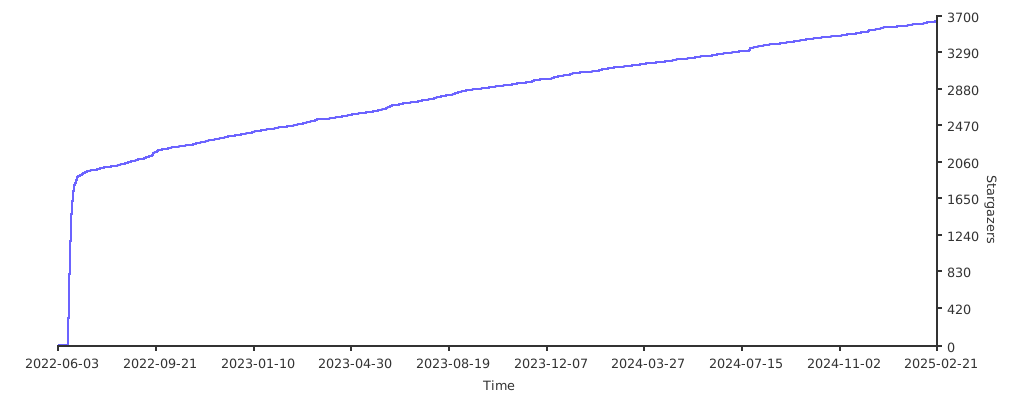
Stargazers over time
Further Reading
- Automated migration from other on-call tools - Migrator
- Documentation - Grafana OnCall
- Overview Webinar - YouTube
- How To Add Integration - How to Add Integration
- Blog Post - Announcing Grafana OnCall, the easiest way to do on-call management
- Presentation - Deep dive into the Grafana, Prometheus, and Alertmanager stack for alerting and on-call management