Grafana OnCall engine fork — self-hosted on-call scheduler and alert router
 8f22b2fd74
**What this PR does**: Adds our first UI integration test using [Playwright](https://playwright.dev/) and runs the test on CI. Right now the test: - logs into Grafana - configures the plugin (if it isn't already) - creates an OnCall schedule, where the current user will be OnCall - creates an escalation chain to notify based on the newly created OnCall schedule - creates a webhook integration, attached to the created escalation chain - sends a demo alert for the new integration - goes to the alert groups page and validates that the escalation step to alert the OnCall user actually happened Currently the Playwright tests are run against the 3 default headless browsers, chromium, Firefox, and webkit. The CI job that runs these tests is run as a matrix against 3 tagged versions of `grafana`; `main`, `latest`, and `9.2.6`. Secondly, it adds most of the logic for a second test which: - logs into Grafana - configures the plugin (if it isn't already) - goes to the user's settings, verifies their phone number (using a tool called [MailSlurp](https://www.mailslurp.com/)) - configures the current user's default escalation policy to send alerts via SMS - creates an escalation policy and configures it to send alerts to our current user - creates an integration and assigns the created escalation policy - triggers a test alert + verifies that we receive the SMS alert text (again, using MailSlurp) **Which issue(s) this PR fixes**: Closes #873 **Checklist** - [x] Tests updated - [ ] Documentation added (N/A) - [ ] `CHANGELOG.md` updated (N/A) |
||
|---|---|---|
| .github | ||
| dev | ||
| docs | ||
| engine | ||
| examples/terraform | ||
| grafana-plugin | ||
| helm | ||
| tools | ||
| .drone.yml | ||
| .gitignore | ||
| .markdownlint.json | ||
| .markdownlintignore | ||
| .nvmrc | ||
| .pre-commit-config.yaml | ||
| CHANGELOG.md | ||
| CODE_OF_CONDUCT.md | ||
| docker-compose-developer.yml | ||
| docker-compose-mysql-rabbitmq.yml | ||
| docker-compose.yml | ||
| GOVERNANCE.md | ||
| LICENSE | ||
| LICENSING.md | ||
| MAINTAINERS.md | ||
| Makefile | ||
| README.md | ||
| screenshot.png | ||
| SECURITY.md | ||

Grafana OnCall







Developer-friendly incident response with brilliant Slack integration.

- Collect and analyze alerts from multiple monitoring systems
- On-call rotations based on schedules
- Automatic escalations
- Phone calls, SMS, Slack, Telegram notifications
Getting Started
We prepared multiple environments:
- production
- developer
- hobby (described in the following steps)
-
Download
docker-compose.yml:curl -fsSL https://raw.githubusercontent.com/grafana/oncall/dev/docker-compose.yml -o docker-compose.yml -
Set variables:
echo "DOMAIN=http://localhost:8080 COMPOSE_PROFILES=with_grafana # Remove this line if you want to use existing grafana SECRET_KEY=my_random_secret_must_be_more_than_32_characters_long" > .env -
Launch services:
docker-compose pull && docker-compose up -d -
Go to OnCall Plugin Configuration, using log in credentials as defined above:
admin/admin(or find OnCall plugin in configuration->plugins) and connect OnCall plugin with OnCall backend:OnCall backend URL: http://engine:8080 -
Enjoy! Check our OSS docs if you want to set up Slack, Telegram, Twilio or SMS/calls through Grafana Cloud.
Update version
To update your Grafana OnCall hobby environment:
# Update Docker image
docker-compose pull engine

# Re-deploy
docker-compose up -d
After updating the engine, you'll also need to click the "Update" button on the plugin version page. See Grafana docs for more info on updating Grafana plugins.
Join community


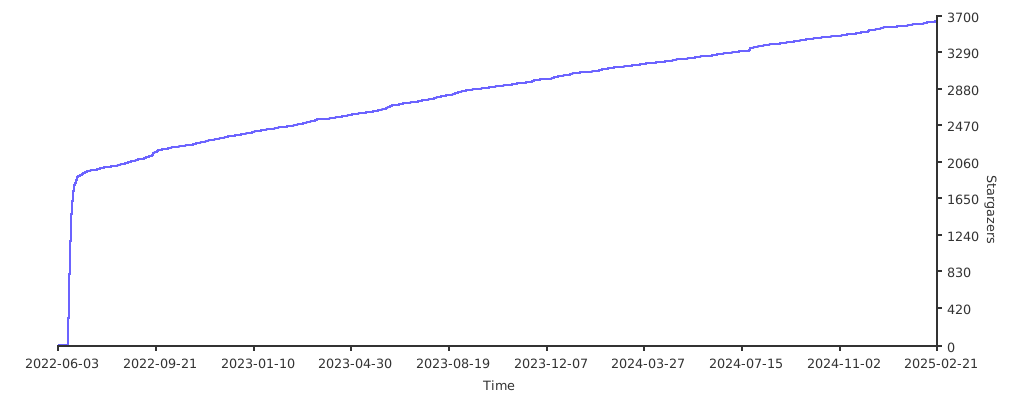
Stargazers over time
Further Reading
- Migration from PagerDuty - Migrator
- Documentation - Grafana OnCall
- Overview Webinar - YouTube
- How To Add Integration - How to Add Integration
- Blog Post - Announcing Grafana OnCall, the easiest way to do on-call management
- Presentation - Deep dive into the Grafana, Prometheus, and Alertmanager stack for alerting and on-call management