| .github | ||
| dev | ||
| docs | ||
| engine | ||
| examples/terraform | ||
| grafana-plugin | ||
| helm | ||
| provisioning/datasources | ||
| tools | ||
| .drone.yml | ||
| .gitignore | ||
| .markdownlint.json | ||
| .markdownlintignore | ||
| .pre-commit-config.yaml | ||
| CHANGELOG.md | ||
| CODE_OF_CONDUCT.md | ||
| docker-compose-developer.yml | ||
| docker-compose-mysql-rabbitmq.yml | ||
| docker-compose.yml | ||
| GOVERNANCE.md | ||
| LICENSE | ||
| LICENSING.md | ||
| MAINTAINERS.md | ||
| Makefile | ||
| README.md | ||
| screenshot.png | ||
| screenshot_mobile.png | ||

Grafana OnCall







Developer-friendly incident response with brilliant Slack integration.
 |


- Collect and analyze alerts from multiple monitoring systems
- On-call rotations based on schedules
- Automatic escalations
- Phone calls, SMS, Slack, Telegram notifications
Getting Started
We prepared multiple environments:
- production
- developer
- hobby (described in the following steps)
-
Download
docker-compose.yml:curl -fsSL https://raw.githubusercontent.com/grafana/oncall/dev/docker-compose.yml -o docker-compose.yml -
Set variables:
echo "DOMAIN=http://localhost:8080 # Remove 'with_grafana' below if you want to use existing grafana # Add 'with_prometheus' below to optionally enable a local prometheus for oncall metrics # e.g. COMPOSE_PROFILES=with_grafana,with_prometheus COMPOSE_PROFILES=with_grafana # to setup an auth token for prometheus exporter metrics: # PROMETHEUS_EXPORTER_SECRET=my_random_prometheus_secret # also, make sure to enable the /metrics endpoint: # FEATURE_PROMETHEUS_EXPORTER_ENABLED=True SECRET_KEY=my_random_secret_must_be_more_than_32_characters_long" > .env -
(Optional) If you want to enable/setup the prometheus metrics exporter (besides the changes above), create a
prometheus.ymlfile (replacingmy_random_prometheus_secretaccordingly), next to yourdocker-compose.yml:echo "global: scrape_interval: 15s evaluation_interval: 15s scrape_configs: - job_name: prometheus metrics_path: /metrics/ authorization: credentials: my_random_prometheus_secret static_configs: - targets: [\"host.docker.internal:8080\"]" > prometheus.ymlNOTE: you will need to setup a Prometheus datasource using
http://prometheus:9090as the URL in the Grafana UI. -
Launch services:
docker-compose pull && docker-compose up -d -
Go to OnCall Plugin Configuration, using log in credentials as defined above:
admin/admin(or find OnCall plugin in configuration->plugins) and connect OnCall plugin with OnCall backend:OnCall backend URL: http://engine:8080 -
Enjoy! Check our OSS docs if you want to set up Slack, Telegram, Twilio or SMS/calls through Grafana Cloud.
Update version
To update your Grafana OnCall hobby environment:
# Update Docker image
docker-compose pull engine

# Re-deploy
docker-compose up -d
After updating the engine, you'll also need to click the "Update" button on the plugin version page. See Grafana docs for more info on updating Grafana plugins.
Join community


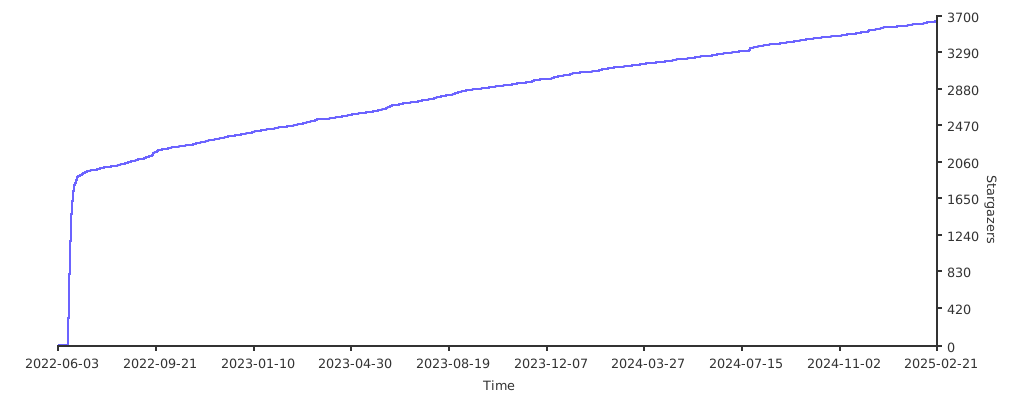
Stargazers over time
Further Reading
- Migration from PagerDuty - Migrator
- Documentation - Grafana OnCall
- Overview Webinar - YouTube
- How To Add Integration - How to Add Integration
- Blog Post - Announcing Grafana OnCall, the easiest way to do on-call management
- Presentation - Deep dive into the Grafana, Prometheus, and Alertmanager stack for alerting and on-call management