 1df1b1eaa0
# Which issue(s) this PR fixes Related to https://github.com/grafana/oncall-private/issues/2363 Addresses this issue that arises when using `cache.get_many`/`cache.set_many` operations with a Redis Cluster: ```python3 File "/usr/local/lib/python3.11/site-packages/redis/cluster.py", line 1006, in determine_slot raise RedisClusterException( redis.exceptions.RedisClusterException: MGET - all keys must map to the same key slot ``` From the Redis Cluster [docs](https://redis.io/docs/reference/cluster-spec/#hash-tags), this can be addressed with this 👇 . Basically this will ensure that keys in multi-key operations will resolve to the same hash slot (read: node): > Hash tags > There is an exception for the computation of the hash slot that is used in order to implement hash tags. Hash tags are a way to ensure that multiple keys are allocated in the same hash slot. This is used in order to implement multi-key operations in Redis Cluster. > > To implement hash tags, the hash slot for a key is computed in a slightly different way in certain conditions. If the key contains a "{...}" pattern only the substring between { and } is hashed in order to obtain the hash slot. However since it is possible that there are multiple occurrences of { or } the algorithm is well specified by the following rules: > > IF the key contains a { character. > AND IF there is a } character to the right of {. > AND IF there are one or more characters between the first occurrence of { and the first occurrence of }. > Then instead of hashing the key, only what is between the first occurrence of { and the following first occurrence of } is hashed. ## Checklist - [x] Unit, integration, and e2e (if applicable) tests updated - [ ] Documentation added (or `pr:no public docs` PR label added if not required) - [ ] `CHANGELOG.md` updated (or `pr:no changelog` PR label added if not required) |
||
|---|---|---|
| .github | ||
| dev | ||
| docs | ||
| engine | ||
| grafana-plugin | ||
| helm | ||
| terraform | ||
| tools | ||
| .dockerignore | ||
| .drone.yml | ||
| .gitignore | ||
| .markdownlint.json | ||
| .markdownlintignore | ||
| .pre-commit-config.yaml | ||
| .yamllint.yml | ||
| CHANGELOG.md | ||
| CODE_OF_CONDUCT.md | ||
| docker-compose-developer.yml | ||
| docker-compose-mysql-rabbitmq.yml | ||
| docker-compose.yml | ||
| GOVERNANCE.md | ||
| LICENSE | ||
| LICENSING.md | ||
| MAINTAINERS.md | ||
| Makefile | ||
| README.md | ||
| screenshot.png | ||
| screenshot_mobile.png | ||
| Tiltfile | ||
Grafana OnCall







Developer-friendly incident response with brilliant Slack integration.
 |


- Collect and analyze alerts from multiple monitoring systems
- On-call rotations based on schedules
- Automatic escalations
- Phone calls, SMS, Slack, Telegram notifications
Getting Started
We prepared multiple environments:
- production
- developer
- hobby (described in the following steps)
-
Download
docker-compose.yml:curl -fsSL https://raw.githubusercontent.com/grafana/oncall/dev/docker-compose.yml -o docker-compose.yml -
Set variables:
echo "DOMAIN=http://localhost:8080 # Remove 'with_grafana' below if you want to use existing grafana # Add 'with_prometheus' below to optionally enable a local prometheus for oncall metrics # e.g. COMPOSE_PROFILES=with_grafana,with_prometheus COMPOSE_PROFILES=with_grafana # to setup an auth token for prometheus exporter metrics: # PROMETHEUS_EXPORTER_SECRET=my_random_prometheus_secret # also, make sure to enable the /metrics endpoint: # FEATURE_PROMETHEUS_EXPORTER_ENABLED=True SECRET_KEY=my_random_secret_must_be_more_than_32_characters_long" > .env -
(Optional) If you want to enable/setup the prometheus metrics exporter (besides the changes above), create a
prometheus.ymlfile (replacingmy_random_prometheus_secretaccordingly), next to yourdocker-compose.yml:echo "global: scrape_interval: 15s evaluation_interval: 15s scrape_configs: - job_name: prometheus metrics_path: /metrics/ authorization: credentials: my_random_prometheus_secret static_configs: - targets: [\"host.docker.internal:8080\"]" > prometheus.ymlNOTE: you will need to setup a Prometheus datasource using
http://prometheus:9090as the URL in the Grafana UI. -
Launch services:
docker-compose pull && docker-compose up -d -
Go to OnCall Plugin Configuration, using log in credentials as defined above:
admin/admin(or find OnCall plugin in configuration->plugins) and connect OnCall plugin with OnCall backend:OnCall backend URL: http://engine:8080 -
Enjoy! Check our OSS docs if you want to set up Slack, Telegram, Twilio or SMS/calls through Grafana Cloud.
Update version
To update your Grafana OnCall hobby environment:
# Update Docker image
docker-compose pull engine

# Re-deploy
docker-compose up -d
After updating the engine, you'll also need to click the "Update" button on the plugin version page. See Grafana docs for more info on updating Grafana plugins.
Join community


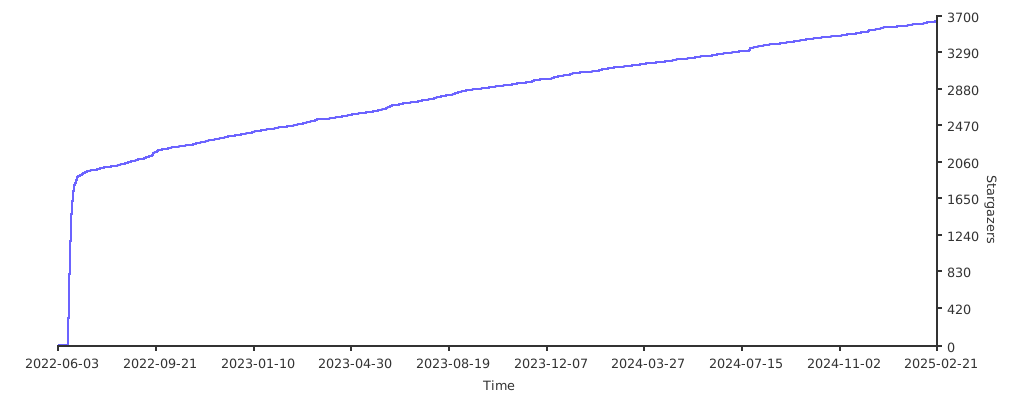
Stargazers over time
Further Reading
- Migration from PagerDuty - Migrator
- Documentation - Grafana OnCall
- Overview Webinar - YouTube
- How To Add Integration - How to Add Integration
- Blog Post - Announcing Grafana OnCall, the easiest way to do on-call management
- Presentation - Deep dive into the Grafana, Prometheus, and Alertmanager stack for alerting and on-call management