# Grafana OnCall
 [](https://github.com/grafana/oncall/releases)
[](https://github.com/grafana/oncall/blob/dev/LICENSE)
[](https://hub.docker.com/r/grafana/oncall/tags)
[](https://slack.grafana.com/)
[](https://github.com/grafana/oncall/discussions)
[](https://drone.grafana.net/grafana/oncall)
Developer-friendly incident response with brilliant Slack integration.
- Collect and analyze alerts from multiple monitoring systems
- On-call rotations based on schedules
- Automatic escalations
- Phone calls, SMS, Slack, Telegram notifications
## Getting Started
We prepared multiple environments:
- [production](https://grafana.com/docs/oncall/latest/open-source/#production-environment)
- [developer](./dev/README.md)
- hobby (described in the following steps)
1. Download [`docker-compose.yml`](docker-compose.yml):
```bash
curl -fsSL https://raw.githubusercontent.com/grafana/oncall/dev/docker-compose.yml -o docker-compose.yml
```
2. Set variables:
```bash
echo "DOMAIN=http://localhost:8080
# Remove 'with_grafana' below if you want to use existing grafana
# Add 'with_prometheus' below to optionally enable a local prometheus for oncall metrics
# e.g. COMPOSE_PROFILES=with_grafana,with_prometheus
COMPOSE_PROFILES=with_grafana
# to setup an auth token for prometheus exporter metrics:
# PROMETHEUS_EXPORTER_SECRET=my_random_prometheus_secret
# also, make sure to enable the /metrics endpoint:
# FEATURE_PROMETHEUS_EXPORTER_ENABLED=True
SECRET_KEY=my_random_secret_must_be_more_than_32_characters_long" > .env
```
3. (Optional) If you want to enable/setup the prometheus metrics exporter
(besides the changes above), create a `prometheus.yml` file (replacing
`my_random_prometheus_secret` accordingly), next to your `docker-compose.yml`:
```bash
echo "global:
scrape_interval: 15s
evaluation_interval: 15s
scrape_configs:
- job_name: prometheus
metrics_path: /metrics/
authorization:
credentials: my_random_prometheus_secret
static_configs:
- targets: [\"host.docker.internal:8080\"]" > prometheus.yml
```
NOTE: you will need to setup a Prometheus datasource using `http://prometheus:9090`
as the URL in the Grafana UI.
4. Launch services:
```bash
docker-compose pull && docker-compose up -d
```
5. Go to [OnCall Plugin Configuration](http://localhost:3000/plugins/grafana-oncall-app), using log in credentials
as defined above: `admin`/`admin` (or find OnCall plugin in configuration->plugins) and connect OnCall _plugin_
with OnCall _backend_:
```text
OnCall backend URL: http://engine:8080
```
6. Enjoy! Check our [OSS docs](https://grafana.com/docs/oncall/latest/open-source/) if you want to set up
Slack, Telegram, Twilio or SMS/calls through Grafana Cloud.
## Update version
To update your Grafana OnCall hobby environment:
```shell
# Update Docker image
docker-compose pull engine
# Re-deploy
docker-compose up -d
```
After updating the engine, you'll also need to click the "Update" button on the [plugin version page](http://localhost:3000/plugins/grafana-oncall-app?page=version-history).
See [Grafana docs](https://grafana.com/docs/grafana/latest/administration/plugin-management/#update-a-plugin) for more
info on updating Grafana plugins.
## Join community
[
[](https://github.com/grafana/oncall/releases)
[](https://github.com/grafana/oncall/blob/dev/LICENSE)
[](https://hub.docker.com/r/grafana/oncall/tags)
[](https://slack.grafana.com/)
[](https://github.com/grafana/oncall/discussions)
[](https://drone.grafana.net/grafana/oncall)
Developer-friendly incident response with brilliant Slack integration.
- Collect and analyze alerts from multiple monitoring systems
- On-call rotations based on schedules
- Automatic escalations
- Phone calls, SMS, Slack, Telegram notifications
## Getting Started
We prepared multiple environments:
- [production](https://grafana.com/docs/oncall/latest/open-source/#production-environment)
- [developer](./dev/README.md)
- hobby (described in the following steps)
1. Download [`docker-compose.yml`](docker-compose.yml):
```bash
curl -fsSL https://raw.githubusercontent.com/grafana/oncall/dev/docker-compose.yml -o docker-compose.yml
```
2. Set variables:
```bash
echo "DOMAIN=http://localhost:8080
# Remove 'with_grafana' below if you want to use existing grafana
# Add 'with_prometheus' below to optionally enable a local prometheus for oncall metrics
# e.g. COMPOSE_PROFILES=with_grafana,with_prometheus
COMPOSE_PROFILES=with_grafana
# to setup an auth token for prometheus exporter metrics:
# PROMETHEUS_EXPORTER_SECRET=my_random_prometheus_secret
# also, make sure to enable the /metrics endpoint:
# FEATURE_PROMETHEUS_EXPORTER_ENABLED=True
SECRET_KEY=my_random_secret_must_be_more_than_32_characters_long" > .env
```
3. (Optional) If you want to enable/setup the prometheus metrics exporter
(besides the changes above), create a `prometheus.yml` file (replacing
`my_random_prometheus_secret` accordingly), next to your `docker-compose.yml`:
```bash
echo "global:
scrape_interval: 15s
evaluation_interval: 15s
scrape_configs:
- job_name: prometheus
metrics_path: /metrics/
authorization:
credentials: my_random_prometheus_secret
static_configs:
- targets: [\"host.docker.internal:8080\"]" > prometheus.yml
```
NOTE: you will need to setup a Prometheus datasource using `http://prometheus:9090`
as the URL in the Grafana UI.
4. Launch services:
```bash
docker-compose pull && docker-compose up -d
```
5. Go to [OnCall Plugin Configuration](http://localhost:3000/plugins/grafana-oncall-app), using log in credentials
as defined above: `admin`/`admin` (or find OnCall plugin in configuration->plugins) and connect OnCall _plugin_
with OnCall _backend_:
```text
OnCall backend URL: http://engine:8080
```
6. Enjoy! Check our [OSS docs](https://grafana.com/docs/oncall/latest/open-source/) if you want to set up
Slack, Telegram, Twilio or SMS/calls through Grafana Cloud.
## Update version
To update your Grafana OnCall hobby environment:
```shell
# Update Docker image
docker-compose pull engine
# Re-deploy
docker-compose up -d
```
After updating the engine, you'll also need to click the "Update" button on the [plugin version page](http://localhost:3000/plugins/grafana-oncall-app?page=version-history).
See [Grafana docs](https://grafana.com/docs/grafana/latest/administration/plugin-management/#update-a-plugin) for more
info on updating Grafana plugins.
## Join community
[ ](https://slack.grafana.com/)
[
](https://slack.grafana.com/)
[ ](https://community.grafana.com/)
Have a question, comment or feedback? Don't be afraid to [open an issue](https://github.com/grafana/oncall/issues/new/choose)!
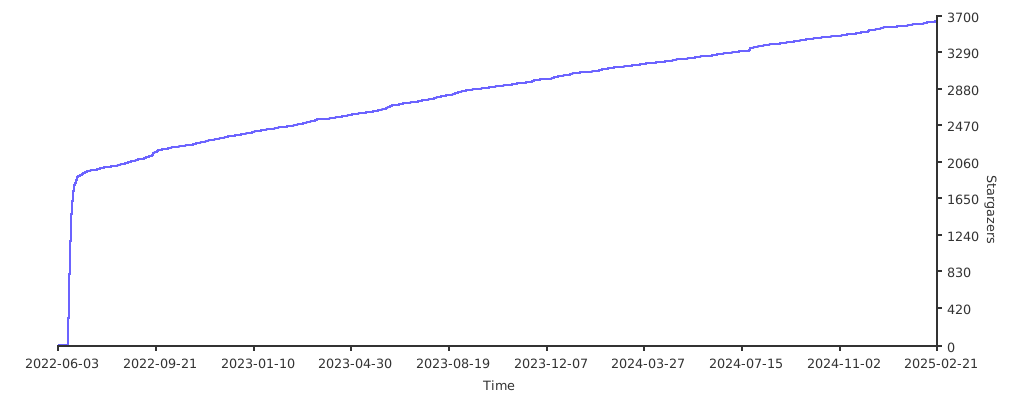
## Stargazers over time
[](https://starchart.cc/grafana/oncall)
## Further Reading
- _Automated migration from other on-call tools_ - [Migrator](https://github.com/grafana/oncall/tree/dev/tools/migrators)
- _Documentation_ - [Grafana OnCall](https://grafana.com/docs/oncall/latest/)
- _Overview Webinar_ - [YouTube](https://www.youtube.com/watch?v=7uSe1pulgs8)
- _How To Add Integration_ - [How to Add Integration](https://github.com/grafana/oncall/tree/dev/engine/config_integrations/README.md)
- _Blog Post_ - [Announcing Grafana OnCall, the easiest way to do on-call management](https://grafana.com/blog/2021/11/09/announcing-grafana-oncall/)
- _Presentation_ - [Deep dive into the Grafana, Prometheus, and Alertmanager stack for alerting and on-call management](https://grafana.com/go/observabilitycon/2021/alerting/?pg=blog)
](https://community.grafana.com/)
Have a question, comment or feedback? Don't be afraid to [open an issue](https://github.com/grafana/oncall/issues/new/choose)!
## Stargazers over time
[](https://starchart.cc/grafana/oncall)
## Further Reading
- _Automated migration from other on-call tools_ - [Migrator](https://github.com/grafana/oncall/tree/dev/tools/migrators)
- _Documentation_ - [Grafana OnCall](https://grafana.com/docs/oncall/latest/)
- _Overview Webinar_ - [YouTube](https://www.youtube.com/watch?v=7uSe1pulgs8)
- _How To Add Integration_ - [How to Add Integration](https://github.com/grafana/oncall/tree/dev/engine/config_integrations/README.md)
- _Blog Post_ - [Announcing Grafana OnCall, the easiest way to do on-call management](https://grafana.com/blog/2021/11/09/announcing-grafana-oncall/)
- _Presentation_ - [Deep dive into the Grafana, Prometheus, and Alertmanager stack for alerting and on-call management](https://grafana.com/go/observabilitycon/2021/alerting/?pg=blog)

